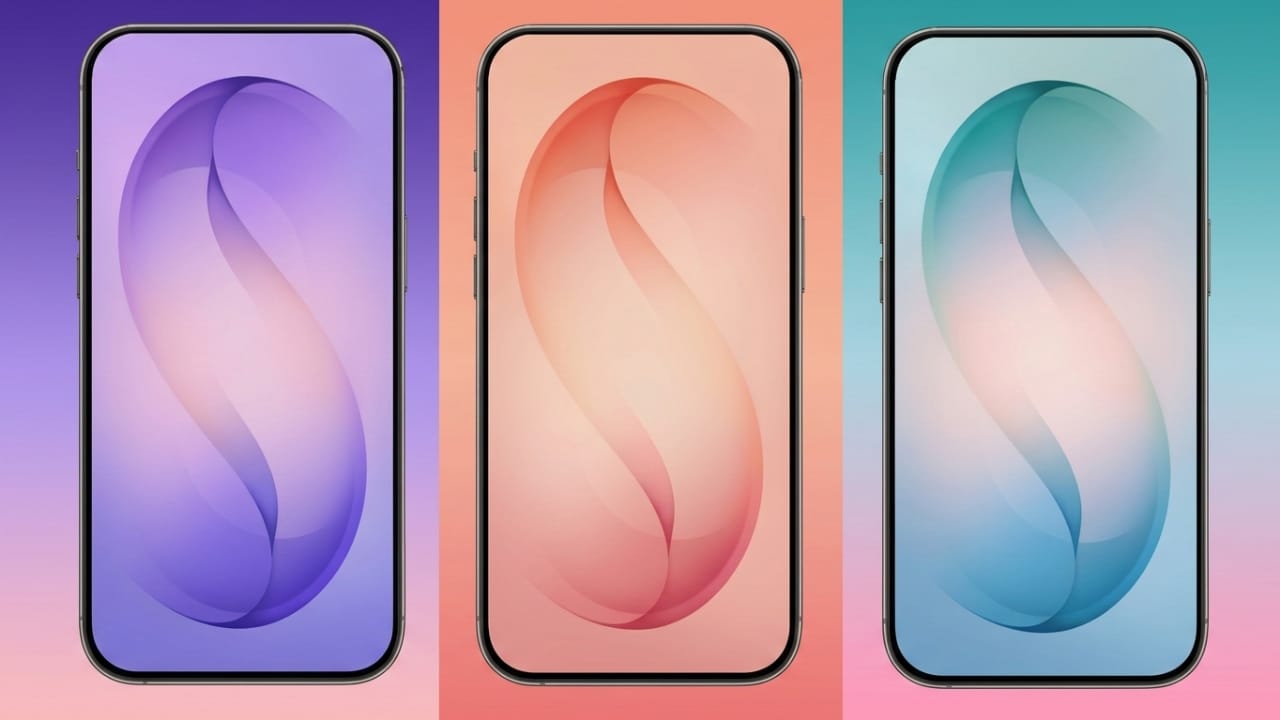
If you want to give your phone a fresh and stylish look, installing new wallpapers is one of the easiest ways to do it. The wallpapers from the Samsung Galaxy S26 Ultra are especially popular because they are colorful, modern, and designed for high-resolution displays.
Samsung introduced its 2026 flagship lineup with three devices: the Galaxy S26, Galaxy S26 Plus, and Galaxy S26 Ultra. Along with improved performance and premium design, these phones also come with a new collection of eye-catching wallpapers and system sounds.
In this guide, you’ll learn about these wallpapers and how you can download and use them on almost any smartphone.
Also read: How to Disable AI Tools in Firefox and Customize Your Browsing Experience
Key Highlights
- Wallpapers are available in 3120 × 3120 pixel resolution, which makes them sharp on modern displays.
- The collection includes static wallpapers and animated live wallpapers.
- They can be used on most smartphones, including Android phones and iPhones.
- Matching wallpapers are designed for each color variant of the phone.
Samsung Galaxy S26 Ultra Wallpaper Designs
Samsung has created a unique set of wallpapers for the Galaxy S26 Ultra. Most of them feature abstract shapes and smooth color blends that look clean and modern on large displays.
A small “S” symbol is included in the design, representing Samsung’s S-series lineup.
Each phone color has its own matching wallpaper, which helps create a consistent visual theme. The main device colors include:
- Black
- Cobalt Violet
- Sky Blue
- White
Samsung also offers two special online-exclusive colors:
- Pink Gold
- Silver Shadow
Because the wallpapers are available in very high resolution, they look sharp even on large screens. The brand has also included animated live wallpapers that add subtle motion effects to the display.
These moving backgrounds make the screen feel more dynamic and can give your phone a fresh appearance every time you unlock it.
How to Download the Wallpapers
Downloading these wallpapers is simple. They are usually available in two ways:
1. Individual Downloads
You can download each wallpaper separately. This option is useful if you only want a specific color or design.
2. Complete Wallpaper Pack
Many websites also provide all wallpapers together in a compressed ZIP file. After downloading the file, you can extract it and choose the wallpapers you like.
Some commonly available designs include:
- Samsung Galaxy S26 Ultra Black Wallpaper
- Samsung Galaxy S26 Ultra Icy Blue Wallpaper
- Samsung Galaxy S26 Ultra Red Wallpaper
- Samsung Galaxy S26 Ultra Gray Wallpaper
- Samsung Galaxy S26 Ultra Purple Wallpaper
- Samsung Galaxy S26 Ultra White Wallpaper
After downloading the image, simply open it on your phone and select the option to set it as your home screen or lock screen wallpaper.
This quick change can instantly make your device look more premium and modern.
Ringtones and System Sounds
Along with wallpapers, Samsung also introduces new system sounds for its flagship devices. One of the most well-known sounds is the “Over the Horizon” ringtone, which receives a refreshed version every year.
The 2026 version continues this tradition with a modern sound style.
Even if you don’t own the Galaxy S26 Ultra, you can still download these sounds and use them on your phone. The collection usually includes:
- Call ringtones
- Notification tones
- Alarm sounds
These audio files are designed to be clear, pleasant, and easy to recognize. Installing them can help recreate the experience of using Samsung’s latest flagship device.
Also read: How to Create High-Quality AI Images Using Midjourney
Final Thoughts
The Samsung Galaxy S26 Ultra wallpaper collection offers vibrant colors, sharp resolution, and stylish designs that work well on almost any smartphone.
With both static and live wallpapers available, you can easily personalize your device and give it a refreshed appearance. Adding the official ringtones and notification sounds can further enhance the experience.
If you want a simple way to update your phone’s look, downloading these wallpapers and sounds is a quick and effective option.

Abhi Rajput, founder of EarnAbhi.in, is a tech lover with 6+ years of experience in SEO, digital tools, and smartphone troubleshooting. He writes simple, clear, and useful guides to help people solve real tech problems.