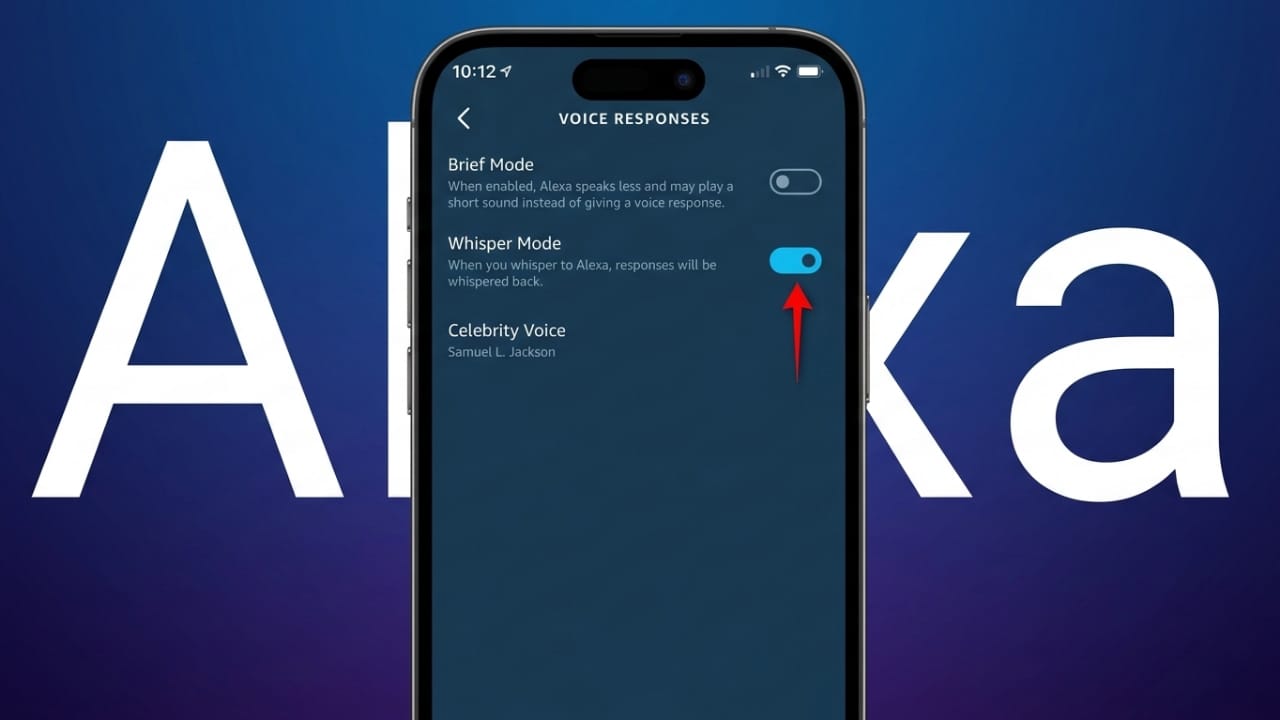
Smart speakers make everyday tasks easier. You can set alarms, control lights, check the weather, or play music with simple voice commands. However, sometimes Alexa’s responses can be louder than expected, especially at night when the house is quiet.
If someone in your home is sleeping, a loud reply from your device may disturb them. This is where Alexa Whisper Mode becomes helpful. When this feature is enabled, Alexa can understand whispered commands and respond in a soft whisper instead of speaking normally.
This small feature can make a big difference in maintaining a quiet and peaceful home environment.
Also read: How to Download Samsung Galaxy S26 Ultra Wallpapers (Step-by-Step Guide)
Key Points to Know
- Whisper Mode allows Alexa to respond quietly when you speak softly.
- The feature can be enabled using a simple voice command.
- You can also activate it through the Alexa mobile app.
- It is useful for late-night interactions when others are sleeping.
What Alexa Whisper Mode Actually Does
When Whisper Mode is turned on, Alexa becomes capable of recognizing very soft speech. If you whisper a command, Alexa detects the tone and responds in a whisper as well.
Normally, voice assistants are designed to recognize clear spoken commands. Whispering changes the sound pattern of speech, making it harder for devices to understand. Alexa uses advanced voice recognition technology to identify these quiet voice patterns.
The system analyzes different audio signals to recognize whispering. It also pays attention to pauses in your command to understand when you have finished speaking. This helps Alexa respond accurately even when you speak very softly.
With this feature active, you do not need to manually reduce the device volume every time you want a quiet response. Alexa automatically adjusts its voice to match the tone of your command.
Devices That Support Whisper Mode
Whisper Mode works on many Alexa-enabled smart speakers, especially Echo devices. These speakers have microphones designed to capture voice commands clearly, even when spoken quietly.
However, the accuracy of whisper detection may depend on a few factors:
- Your distance from the device
- Background noise such as TV or music
- Where the speaker is placed in the room
- The specific Echo device model you are using
Keeping your device updated with the latest software can also help improve voice recognition performance.
Why Whisper Mode Is Useful
Many people interact with Alexa during late-night hours. For example, you may suddenly remember that you need to set an alarm or check the weather for the morning.
If you speak normally, the device might reply loudly and wake someone nearby.
Before Whisper Mode was introduced, users often had to take extra steps, such as lowering the device volume first or walking closer to the speaker to speak quietly. This was not very convenient.
With Whisper Mode enabled, you can simply whisper your command from where you are. Alexa will understand it and respond softly.
Helpful for Families and Parents
Parents often find this feature especially useful. Loud sounds can easily wake sleeping babies or children.
Whisper Mode allows parents to manage tasks quietly, such as:
- Turning lights on or off
- Playing soft music at bedtime
- Stopping alarms quietly
- Checking reminders or the weather
Because Alexa replies in a whisper, it helps keep the room calm and undisturbed.
Useful in Shared Living Spaces
This feature can also help people who live with roommates or family members who have different schedules.
For example, someone may still be awake late at night while others are sleeping. Whisper Mode allows them to control smart devices without creating unnecessary noise.
You can quietly control things like:
- Smart lights
- Room temperature settings
- Fans or other connected devices
- Smart locks and other home controls
All responses remain soft and unobtrusive.
How to Turn On Alexa Whisper Mode
There are two easy ways to enable Whisper Mode. You can use a voice command or activate it through the Alexa mobile app.
Method 1: Enable Whisper Mode with a Voice Command
This is the quickest method.
Simply say:
“Alexa, turn on Whisper Mode.”
Alexa will confirm that the feature has been activated.
If you want to disable it later, you can say:
“Alexa, turn off Whisper Mode.”
No additional setup is required.
Method 2: Enable Whisper Mode Through the Alexa App
You can also activate the feature manually from your phone.
Follow these steps:
- Open the Alexa app on your smartphone.
- Tap More in the bottom menu.
- Select Settings.
- Scroll down and tap Voice Responses.
- Turn on the Whisper Mode toggle.
Once enabled, Alexa will automatically detect whisper commands.
Optional Feature: Turn On Brief Mode
Another helpful setting is Brief Mode. This option reduces the number of spoken confirmations Alexa gives.
For example, instead of saying “OK” every time you give a command, Alexa may simply play a short sound.
You can enable it by saying:
“Alexa, turn on Brief Mode.”
Or activate it in the Alexa app:
- Open the Alexa app.
- Go to More → Settings.
- Select Voice Responses.
- Enable Brief Mode.
This makes interactions shorter and less disruptive.
Optional Tip: Disable Shopping Suggestions
Alexa may sometimes suggest products or send shopping-related notifications. If you find these interruptions unnecessary, you can turn them off.
Steps to disable them:
- Open the Alexa app.
- Go to Settings.
- Tap Notifications.
- Select Amazon Shopping.
- Turn off recommendation or product suggestion alerts.
This reduces extra notifications from the device.
Also read: How To Get Loan From Kissht App – Simple Step-by-Step Guide
Final Thoughts
Alexa Whisper Mode is a simple feature that makes smart speakers more convenient to use during quiet hours. It allows Alexa to understand whispered commands and reply in a soft voice.
This feature is especially helpful at night, in homes with children, or in shared living spaces where loud responses may disturb others.
By enabling Whisper Mode, you can continue using Alexa normally while keeping your home calm and quiet.

Abhi Rajput, founder of EarnAbhi.in, is a tech lover with 6+ years of experience in SEO, digital tools, and smartphone troubleshooting. He writes simple, clear, and useful guides to help people solve real tech problems.