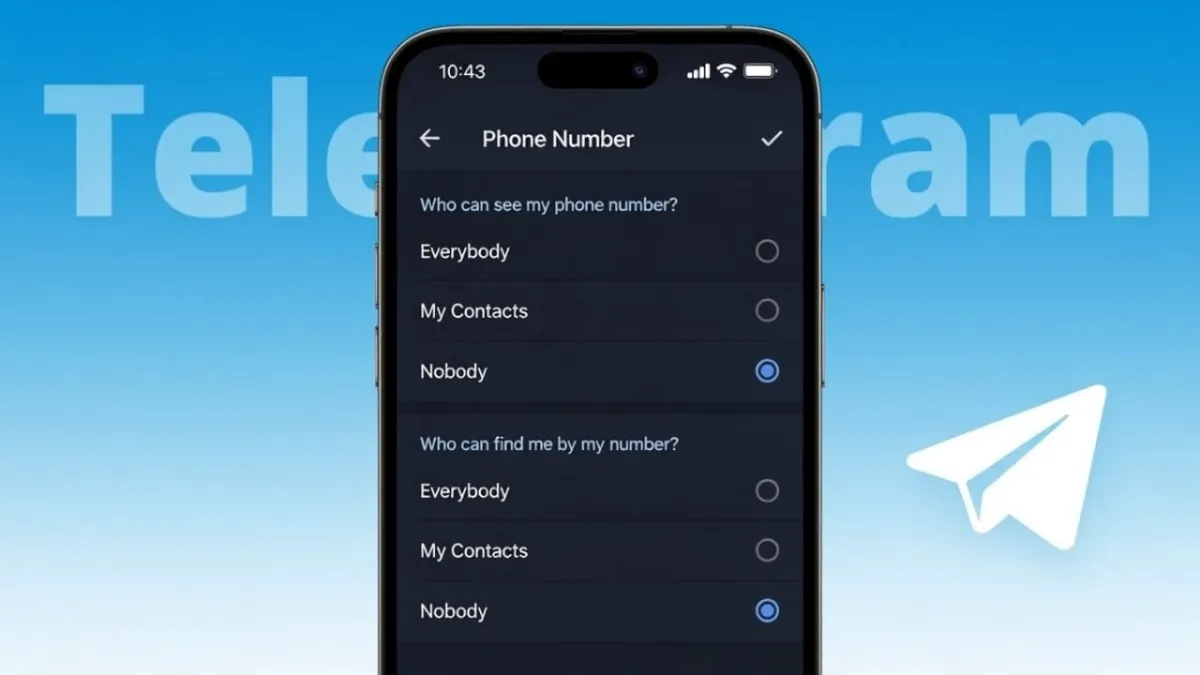
Telegram is popular because it gives users strong control over privacy. However, many people don’t realize that their phone number may be visible unless they change the settings. If you want to keep your number private, Telegram already has simple options to do that.
Advertisements
This article explains, in clear and simple language, how to hide your phone number on Telegram, what each setting means, and what changes after you update them.
Also read: How to Make Your Own Custom Emojis on Telegram
Why Hiding Your Phone Number Is a Good Idea
Your phone number is required to create a Telegram account, but it doesn’t have to be shown to others. Many users prefer to hide it for practical reasons, such as:
- Reducing spam or unwanted messages
- Keeping personal information private
- Using Telegram for public groups or channels
- Separating work contacts from personal chats
Telegram allows you to decide exactly who can see your number and who cannot.
Steps to Hide Your Phone Number on Telegram
You can change your phone number visibility from Telegram’s privacy settings. The process is almost the same on Android, iPhone, and desktop.
Step-by-Step Instructions
- Open the Telegram app
- Tap on Settings
- Go to Privacy and Security
- Select Phone Number
You will now see options that control who can view your phone number.
Set Who Can See Your Phone Number
Under the option Who can see my phone number, you can choose one of the following:
- Everybody
- My Contacts
- Nobody
If you want full privacy, select Nobody. This ensures your phone number is hidden from all users.
Control Who Can Find You Using Your Number
Just below that, you will see Who can find me by my number. This setting controls whether people can search for your profile using your phone number.
You can choose:
- Everybody
- My Contacts
Selecting My Contacts adds an extra layer of privacy by limiting who can find you through your number.
Use Exceptions for More Control
Telegram also allows you to customize access using exceptions:
- Always allow – Share your number with selected contacts
- Never allow – Block specific users from seeing your number
This feature is useful if you want only a few trusted people to have access.
What Happens After You Hide Your Number
Once you hide your phone number:
- New users will not be able to see it
- Your existing chats remain unchanged
- Your username stays visible
- You can send and receive messages normally
- All Telegram features continue to work as usual
Hiding your number does not affect how Telegram functions.
How Others Can Contact You Without Your Number
Even if your phone number is hidden, people can still reach you through:
- Your Telegram username
- Mutual groups
- Channels where you are active
Using a username is the best way to stay reachable without sharing personal details.
Important Points to Keep in Mind
- Hiding your number does not delete your account
- You can change these settings anytime
- People who already saved your number may still recognize you
- The same privacy settings apply across all your devices
Also read: How to Add Pronouns on Instagram Profile (Easy Step-by-Step Guide)
Final Words
Telegram offers strong privacy tools, and hiding your phone number is one of the easiest ways to protect your personal information. With just a few setting changes, you can stay active on Telegram without exposing your number. If privacy matters to you, using a username and keeping your number hidden is a smart and safe choice.

Abhi Rajput, founder of EarnAbhi.in, is a tech lover with 6+ years of experience in SEO, digital tools, and smartphone troubleshooting. He writes simple, clear, and useful guides to help people solve real tech problems.
Advertisements