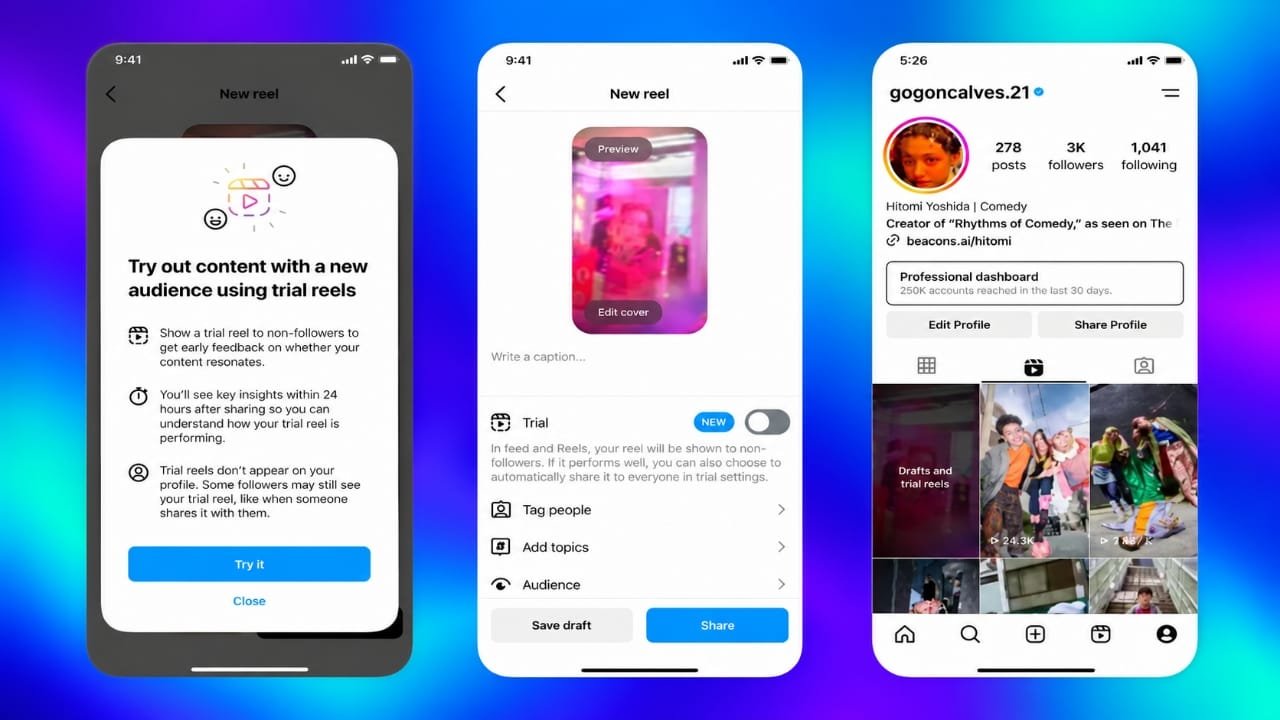
Instagram creators are always looking for ways to improve their videos and reach new audiences. However, it can be difficult to know whether a new content idea will work before sharing it with followers. Instagram Trial Reels offer a way to experiment with different video ideas before making them available to your wider audience.
With this feature, you can share a Reel with people who do not follow you initially, review its performance, and decide whether to publish it for everyone. It can be useful for testing new topics, experimenting with different video styles, and understanding what attracts potential followers.
Advertisements
In this guide, you will learn how Instagram Trial Reels work, how to publish one, which insights to check, and what to do if the option is missing from your account.
Also read: OpenAI Introduces Two New Hindi Voices in ChatGPT for Indian Users
What Are Instagram Trial Reels?
Instagram Trial Reels are designed to help creators test video content with an audience beyond their existing followers. Instead of immediately sharing a new idea with everyone, you can publish it as a trial and evaluate how people respond.
For example, imagine you usually post technology tips but want to experiment with smartphone photography tutorials. You might not know whether your existing audience will enjoy the new topic. A Trial Reel gives you an opportunity to see how people who do not follow your account respond before deciding whether to share it more widely.
Trial Reels are not private videos. Although they are initially distributed mainly to non-followers, people may still encounter them through certain sharing methods, including direct messages or pages associated with audio, locations, and effects.
The feature is best understood as a content-testing tool, not a guarantee of higher views or viral reach.
Trial Reels vs. Regular Reels: Key Differences
Both formats allow you to publish short videos on Instagram, but their initial distribution and publishing controls differ.
| Feature | Regular Reels | Trial Reels |
|---|---|---|
| Initial audience | Followers and other eligible viewers | Primarily non-followers |
| Profile visibility | Normally appears on your profile after publishing | Not shown on your main profile grid or Reels tab to others until shared with everyone |
| Main purpose | Share content with your audience | Test a new content idea |
| Publishing control | Published directly to your audience | Can be reviewed before wider sharing |
| Performance review | Insights are available when supported | Insights help you evaluate the trial before deciding what to do next |
The main advantage of Trial Reels is the opportunity to learn from an initial audience before introducing a video to your followers.
Why Should You Use Instagram Trial Reels?
Trial Reels can help you make more informed content decisions. Here are some practical reasons to try them.
1. Experiment With New Topics
You may want to explore a subject that is different from your usual content. For example, a food creator who normally shares recipes could test kitchen tips or budget-friendly meal ideas.
A trial allows you to explore a new direction without immediately adding the video to your regular profile grid.
2. Understand What Appeals to New Viewers
Your existing followers may already be familiar with your content. People discovering your account for the first time may have different interests.
Their reactions can provide clues about which topics, openings, and presentation styles are worth exploring further.
3. Discover Content That Attracts Relevant Followers
A high view count does not always mean a video has reached the right audience. You may get more value from a video that attracts people who genuinely care about your subject.
Look at signals such as shares, saves, profile visits, and other available engagement metrics to understand how viewers respond.
4. Improve Your Content Strategy
Testing different approaches can help you make better decisions when planning future Reels.
You might discover that short demonstrations attract more shares, while detailed tutorials receive more saves. These patterns can guide your next experiments, although individual results may vary.
5. Explore Different Creative Styles
Trial Reels provide an opportunity to try formats you do not normally use.
For example, you could experiment with:
- Short educational videos.
- Personal stories and experiences.
- Step-by-step demonstrations.
- Frequently asked questions.
- Common mistakes and practical solutions.
- Before-and-after explanations where appropriate.
Not every experiment will succeed, and that is normal. The goal is to learn what works for your audience rather than expecting every video to perform exceptionally well.
How to Use Instagram Trial Reels Step by Step
You can get started using the Instagram app and a video idea. Follow these steps to check whether the feature is available on your account.
Step 1: Update Instagram and Prepare Your Video
Open the official app store on your phone and check whether an Instagram update is available. An updated app can help ensure that you have access to the latest interface offered to your account.
Next, open Instagram and tap the plus icon to create a Reel. Record a new video or upload an existing clip.
Before moving to the publishing screen, make sure your video communicates its main idea clearly.
Keep these points in mind:
- Focus on one main subject.
- Remove unnecessary sections that slow down the video.
- Use readable on-screen text where helpful.
- Choose audio that suits your content.
- Make sure the important information is easy to understand.
- Use footage and music you have the right to publish.
A clear and useful video is a better starting point than one filled with unnecessary effects.
Step 2: Find and Enable the Trial Option
Finish editing your Reel and move to the final sharing screen.
Look for the Trial option in the publishing settings. If it appears, enable it before publishing the video.
Check the remaining settings, including your caption and other sharing preferences, and publish the Reel.
Your video will initially be distributed primarily to people who do not follow you. It will not normally appear on your main profile grid or Reels tab for others unless you decide to share it with everyone.
Important: The available options can vary depending on Instagram’s current interface and account access. If you cannot find Trial, follow the troubleshooting steps later in this guide.
Step 3: Wait and Review Your Insights
After publishing, give the Reel some time to collect performance data.
Meta has explained that key Trial Reel metrics become available after approximately 24 hours. The exact amount of activity and information available may vary.
Open the trial and review its available insights.
Pay attention to these metrics:
Views: Shows how many times the Reel was viewed under Instagram’s applicable counting rules. Views are not necessarily the same as unique people.
Likes: Indicate how many likes the video received.
Comments: Help you understand whether viewers are responding to the subject or asking questions.
Shares: Show how often people share the Reel with others.
Saves: Can indicate that viewers want to return to the content later.
Profile visits: May help you understand whether the video encouraged viewers to explore your account, when this information is available.
Watch time: Can help you evaluate how viewers watched the video, depending on the insights Instagram provides.
Do not judge a trial using views alone. A video with fewer views may still attract more relevant engagement or generate greater interest in your account.
Step 4: Decide Whether to Share It With Everyone
After reviewing the available data, decide what to do next.
If the Reel attracts the type of audience you want and its performance supports your goals, you can choose to share it with everyone. It can then appear on your profile and become eligible for wider distribution, including to your followers.
If the results are weaker than expected, you can leave the video as a trial and use what you learned to improve your next attempt.
Remember that a trial has already been published to an initial audience. It is not the same as an unpublished draft.
Instagram also offers an automatic-sharing setting for eligible trials. When enabled, a trial may be shared with followers based on its views during the first 72 hours. Automatic sharing is not a guarantee that every trial will be shared after exactly 72 hours.
If you want to review each experiment before wider publication, check your settings and use manual sharing when appropriate.
How to Improve Your Instagram Trial Reels
Publishing a trial is only the first step. The next step is to design experiments that help you understand your audience.
1. Start With a Clear Hook
The opening moments of a video should help viewers understand why the content matters to them.
Avoid long introductions that delay the main point. Instead, introduce a problem, ask a relevant question, or explain what viewers will learn.
For example, a wedding photographer could begin with:
“Planning your wedding? Here are three photography details worth discussing before the big day.”
This opening tells viewers what the video covers and why it might be useful.
After attracting attention, deliver the promised information. A strong opening will not help much if the rest of the video fails to provide value.
2. Write Captions That Add Useful Context
Your caption should complement the video instead of simply repeating its opening line.
Use it to explain the subject, add a helpful detail, or provide context that may not fit into the Reel itself.
For example, a photographer could use the caption to explain questions couples should ask before hiring a wedding photographer.
Keep your writing clear and relevant. Avoid exaggerated claims, unnecessary keyword repetition, and promises you cannot support.
3. Test Different Video Formats
People respond differently to different types of content. Rather than relying on one format, experiment with several approaches.
You could compare:
- A quick tip against a detailed explanation.
- A direct introduction against a question-based opening.
- A demonstration against a storytelling format.
- A talking-head video against one using on-screen text.
Whenever possible, change one major element at a time. This makes the results easier to interpret.
You can also experiment with publishing times, but compare similar videos and remember that timing alone cannot guarantee better engagement.
Use relevant hashtags when they help describe the subject of your video. Avoid adding unrelated hashtags simply to attract more attention.
4. Keep a Record of Your Experiments
A simple tracking sheet can help you identify patterns across multiple trials.
Record details such as:
- The topic of each Reel.
- Its opening hook.
- The video format and length.
- The caption used.
- The publication date and time.
- The time when you reviewed the results.
- Views and available engagement metrics.
- What you would change next time.
For example, you might notice that tutorial videos receive more saves, while personal stories attract more comments. After several comparable trials, these observations can help you decide which formats deserve further testing.
Avoid repeatedly uploading identical videos without a clear reason. Instead, make meaningful improvements to the opening, explanation, or presentation.
If you use a scheduling or editing service, check whether it currently supports Trial Reels before relying on it for publication.
Why Is the Instagram Trial Reels Option Missing?
If you cannot find the Trial option, try the following troubleshooting steps.
1. Update the Instagram App
Visit your device’s official app store and check for an available Instagram update. Then reopen the app and check the Reel publishing screen again.
2. Restart Instagram
Close the app completely and open it again. A temporary interface issue may sometimes prevent an option from appearing correctly.
3. Check the Final Sharing Screen
Create or edit a Reel and carefully review the available publishing settings. Make sure you are looking at the final sharing screen rather than the editing tools.
4. Review Instagram’s Official Help Resources
Meta announced the wider rollout of Trial Reels in June 2025. However, if the feature is missing from your account, checking your current app interface and Instagram’s official guidance is more useful than relying on outdated eligibility claims.
5. Report the Problem if Necessary
If the option remains unavailable, use Instagram’s in-app reporting tools or consult its Help Center.
Avoid third-party applications that claim they can unlock hidden Instagram features. They may not provide the functionality they advertise and could put your account information at risk.
Updating the app and restarting it are useful first steps, but they cannot guarantee that the Trial option will become available.
A Simple Plan for Testing Trial Reels
You do not need a complicated spreadsheet or a large number of videos to begin learning from your trials.
Start by choosing one question you want to answer.
For example: Does a question-based opening encourage more shares than a straightforward introduction?
Create two similar videos using the same general topic and comparable footage. Change the opening while keeping the other major elements as consistent as possible.
Publish the trials, allow them time to collect data, and record their results at comparable intervals.
Consider this illustrative example:
| Metric | Version A | Version B |
|---|---|---|
| Views | 1,000 | 600 |
| Shares | 10 | 18 |
| Shares per view | 1% | 3% |
Version A received more views, but Version B had a higher share rate.
Which one is better? That depends on your goal. If your priority is reaching more viewers, Version A has the higher view count. If your focus is encouraging people to share the content, Version B looks more promising based on this example.
These figures are hypothetical and are included only to explain how comparisons work.
Also, remember that Trial Reels are not controlled A/B tests. Instagram may distribute different videos to different people under different conditions. Treat the results as useful clues rather than definitive proof that one change caused a particular outcome.
Frequently Asked Questions About Instagram Trial Reels
Who Can Use Instagram Trial Reels?
Meta announced broader availability in June 2025. To determine whether you can use the feature, check the publishing options in your Instagram app. Avoid assuming that an older follower-count requirement applies universally.
How Many Trial Reels Can You Publish in a Day?
There is no universal daily number established in the information covered by this guide. Check your current Instagram interface for any applicable limits rather than relying on unsupported claims about a fixed number of daily trials.
Does a Trial Reel Count as a Regular Post?
A Trial Reel is already a published video distributed to an initial audience. It differs from a draft because it has been shared on Instagram.
Choosing to share it with everyone makes it available to your broader audience and allows it to appear on your profile as applicable.
Can You Turn a Successful Trial Reel Into a Regular Reel?
Yes. Instagram allows you to choose to share a trial with everyone. This is useful when you want to review its initial performance before introducing it to your followers.
Will Every Trial Reel Reach More People After 72 Hours?
No. Automatic sharing may be available when the relevant setting is enabled, but it does not guarantee that every trial will be shared after 72 hours. Check the current settings and guidance in your app.
Do Trial Reels Guarantee More Followers?
No. Trial Reels are a testing feature, not a guaranteed growth method. Results depend on several factors, including the subject, presentation, audience interest, and how the content is distributed.
Best Practices for Growing With Trial Reels
To get more value from Trial Reels, focus on useful content and consistent learning rather than chasing a particular view count.
Make Videos That Solve Real Problems
Think about the questions your audience regularly asks. Identify common mistakes, practical challenges, and topics that deserve a clearer explanation.
For example, a digital marketing creator could test videos about keyword research, website speed, content planning, or common advertising mistakes.
Review which subjects attract meaningful engagement, then explore those topics further.
Avoid Common Testing Mistakes
Keep these points in mind when experimenting with Trial Reels:
- Do not change several major elements at once if you want to compare specific approaches.
- Do not judge a video’s success by views alone.
- Do not expect every trial to go viral.
- Do not assume that one successful result will be repeated every time.
- Do not publish identical versions repeatedly without a clear testing purpose.
- Check automatic-sharing settings before publishing if you want to control when followers see your content.
- Do not treat a small amount of data as conclusive evidence.
The most useful result is not always the video with the highest number of views. It is the experiment that helps you make a better-informed decision about your next piece of content.
Also read: How to Check If Your iPhone Is Unlocked
Final Thoughts
Instagram Trial Reels give creators a practical way to explore new ideas before sharing them with their wider audience. By experimenting with different hooks, topics, captions, and video formats, you can learn more about how unfamiliar viewers respond to your content.
Start with one clear objective, review the available insights, and record what you learn. Use the results to improve future videos rather than expecting every trial to succeed.
With consistent testing and a focus on providing genuine value, Trial Reels can become a useful part of your Instagram content strategy.

Abhi Rajput, founder of EarnAbhi.in, is a tech lover with 6+ years of experience in SEO, digital tools, and smartphone troubleshooting. He writes simple, clear, and useful guides to help people solve real tech problems.