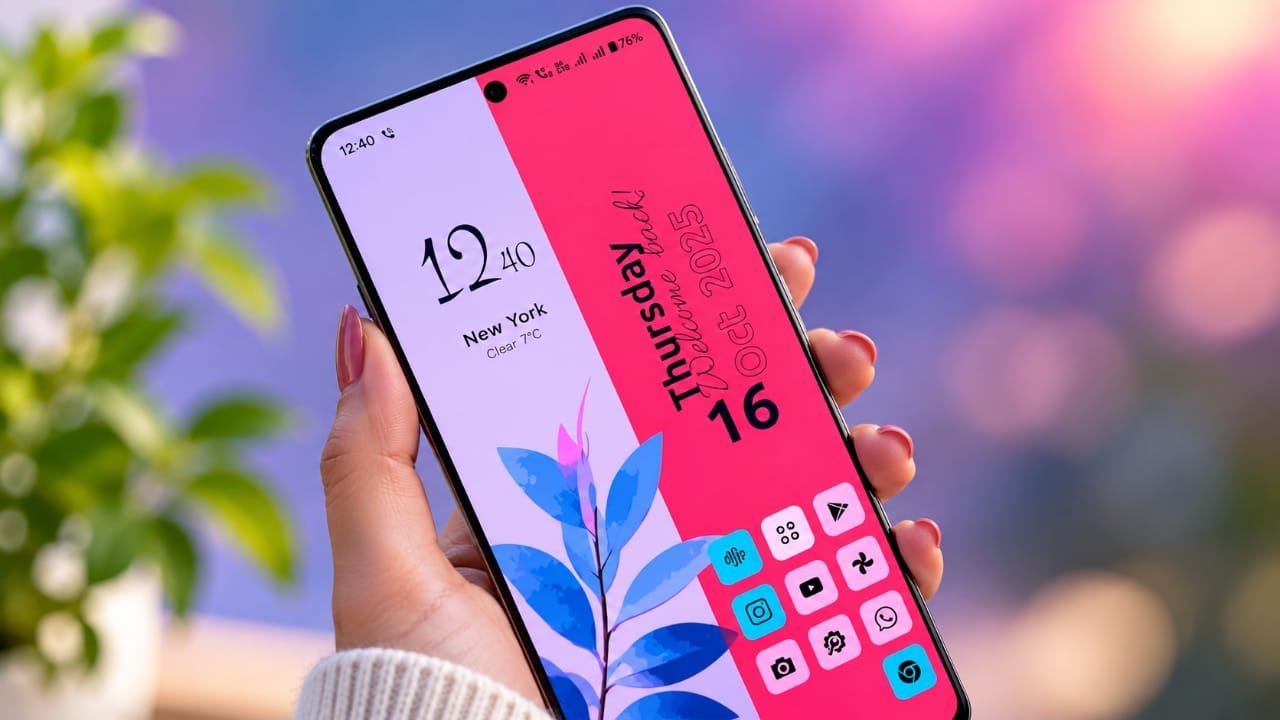
The home screen is one of the first things you see every time you unlock your Android phone. While the default launcher works well for most users, some people want more control over the way their phone looks and feels.
Advertisements
That is where a third-party launcher can be useful.
53 Themes, Zero Clutter – Modern Launcher focuses on a clean interface, theme customization, and simple controls. Instead of filling the home screen with unnecessary elements, the launcher is designed around a more organized and minimal layout.
Also read: How to Make Your Android Phone Look Like a Windows 11 PC
53 Themes for a Different Look
One of the main attractions of this launcher is its collection of 53 themes. The available designs can give the home screen a different visual style without requiring users to customize every element manually.
Depending on your preference, you can choose a simple design for everyday use, a colorful appearance for a more vibrant look, or a futuristic style if you prefer something different.
Having multiple themes in one place also makes it easier to change the appearance of the phone whenever you want a fresh look.
A Cleaner Home Screen
The launcher puts more focus on keeping the home screen organized.
Instead of adding lots of shortcuts and unnecessary elements, you can arrange your apps in a way that suits your daily usage. Apps can be grouped into folders or categories, helping you find commonly used applications more easily.
A simpler layout can also make the interface feel less crowded, especially for users who prefer a minimal home screen.
Search and Gesture Controls
Finding an app can become inconvenient when a phone has dozens of applications installed. A search feature can make this process easier by allowing users to quickly look for apps instead of scrolling through multiple pages.
The launcher also supports gesture-based controls, depending on the options available on the device and launcher version. These gestures can be configured for actions such as opening features or accessing specific parts of the interface.
For users who enjoy shortcuts, gesture controls can make everyday navigation more convenient.
Customization Without Too Much Complexity
Customization is one of the biggest reasons people install Android launchers.
With this launcher, users can personalize different parts of the home screen. Depending on the available settings, customization may include options such as:
- Changing the icon appearance
- Adjusting the home screen layout
- Modifying the grid size
- Using different visual effects
- Adjusting transparency
- Changing other interface elements
This gives users more freedom than a basic default home screen while keeping the customization process relatively straightforward.
Designed With a Minimal Approach
The idea behind a zero-clutter interface is simple: keep the important things accessible and avoid filling the screen with elements you rarely use.
A minimal layout can make the home screen easier to understand, particularly for people who prefer a clean and distraction-free appearance.
The actual performance and battery impact can vary depending on the Android device, launcher version, settings, and other apps running in the background. So, rather than expecting a guaranteed performance boost, users should consider the launcher mainly for its interface and customization features.
Is It Useful for Older Android Phones?
A lightweight launcher may be worth considering if the default interface on an older phone feels unnecessarily busy. However, a launcher cannot guarantee that an old smartphone will become as fast as a newer device.
Performance depends on several factors, including the phone’s processor, RAM, storage condition, Android version, and background applications.
If your main goal is to make the phone’s interface cleaner and easier to navigate, a lightweight launcher can still make the overall experience feel more comfortable.
Why Consider 53 Themes, Zero Clutter – Modern Launcher?
There are several reasons Android users may want to try this type of launcher:
1. Multiple themes
The collection of 53 themes gives users different visual options for the home screen.
2. Minimal interface
The cleaner layout can help reduce unnecessary clutter.
3. Search functionality
Searching can be more convenient than manually looking through multiple app pages.
4. Gesture support
Custom gestures can provide quick access to frequently used actions.
5. Home screen customization
Users can adjust the appearance and layout according to their preferences.
Official Play Store App Link
Also read: Droid Lab App for Android: Gestures, Shortcuts and Useful Controls
Final Thoughts
A launcher can change more than just the wallpaper or icons on an Android phone. It can also affect how you organize apps and interact with the home screen every day.
53 Themes, Zero Clutter – Modern Launcher is aimed at users who want a combination of themes, customization options, search tools, and a cleaner interface.
Its 53-theme collection can help give the phone a new appearance, while the minimal layout may appeal to users who do not like a crowded home screen.
If you enjoy experimenting with Android customization and want a different look without completely changing how you use your phone, this launcher may be worth checking out. Before installing it, however, it is always a good idea to review the app’s current features, permissions, compatibility, and privacy information on its official listing.

Abhi Rajput, founder of EarnAbhi.in, is a tech lover with 6+ years of experience in SEO, digital tools, and smartphone troubleshooting. He writes simple, clear, and useful guides to help people solve real tech problems.
Advertisements