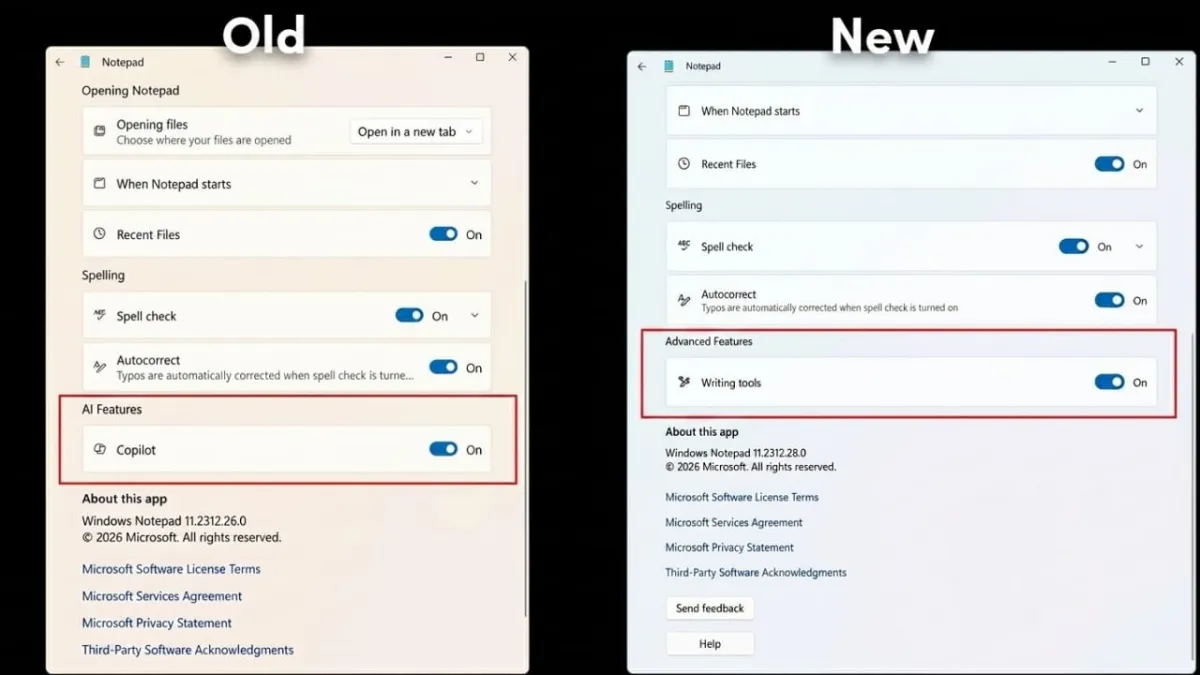
Microsoft has made a small but noticeable change to Notepad. The familiar Copilot button is no longer there. In its place, users now see a cleaner “Writing tools” option. Even though the name and icon have changed, the AI-powered features are still fully available.
This update is part of Microsoft’s effort to simplify its apps and make them easier to use without unnecessary clutter.
Advertisements
Also read: How to Turn Voice Recordings into Text on Android (Easy Guide)
What Has Changed in Notepad?
In the latest Notepad version (11.2512.28.0), the Copilot button has been replaced with a pen icon that opens the “Writing tools” menu. This change first appeared in preview builds and is now reaching regular users through updates.
Instead of a separate AI button, everything is now grouped under one menu. The goal is to keep the interface clean while still offering useful features.
AI Features Still Available
Even after the rename, all the core AI tools are still there. They are just organized differently:
- Rewrite Tool: Helps improve text by adjusting tone and clarity
- Summarize Tool: Turns long content into shorter, easy-to-read summaries
- Write Tool: Generates content based on simple prompts
- Formatting Support: Assists with structuring text neatly
These tools are now easier to access from one place, making the experience smoother.
Settings and Control
Microsoft has also updated the settings section slightly:
- AI tools are now listed as “Advanced features”
- Users can turn these features on or off anytime
- The toggle for writing tools has been moved into this section
The backend system remains the same—only the labels and layout have changed.
Also read: OpenAI–Microsoft Partnership Update: A Simpler, More Flexible Approach
Why Microsoft Made This Change
This update is seen as part of a larger strategy. Instead of highlighting the Copilot brand everywhere, Microsoft is focusing more on usability and design.
Some key reasons behind this shift:
- Reduce interface clutter
- Make features easier to find
- Create a more consistent design across apps
- Improve performance and stability
What to Expect Next
This change in Notepad may not be the last. Microsoft is likely to apply similar updates across other apps like:
- Photos
- Snipping Tool
- Paint
- File Explorer
In many cases, Copilot buttons may be replaced or integrated more subtly into the interface.
Also read: Google Introduces “Verified Email” to Simplify Account Sign-Ups
Final Thoughts
The update does not remove any functionality—it simply changes how users access it. By moving AI features into the “Writing tools” menu, Microsoft has made Notepad cleaner and easier to navigate.
As more apps receive similar updates, users can expect a more consistent and streamlined experience across Windows.

Abhi Rajput, founder of EarnAbhi.in, is a tech lover with 6+ years of experience in SEO, digital tools, and smartphone troubleshooting. He writes simple, clear, and useful guides to help people solve real tech problems.