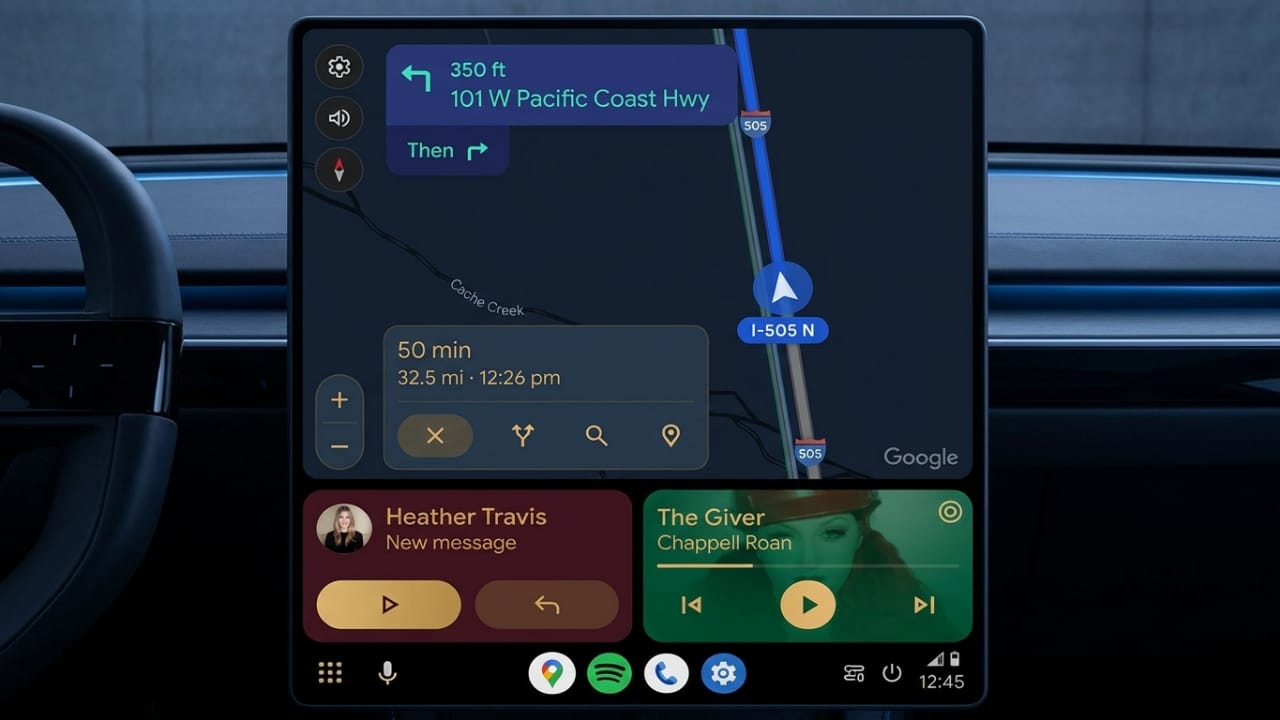
Google Maps has introduced a small but useful update for Android Auto users. The app now displays larger street labels during navigation, making road names easier to read while driving.
This improvement is designed to help drivers recognize streets faster without getting distracted. The updated labels are cleaner, clearer, and more visible on the screen, especially during active navigation.
Advertisements
Also read: Google Gemini Now Lets Users Create Documents, Sheets, and Presentations Inside Chat
Bigger Street Names Improve Visibility
Previously, many users found the street labels in Google Maps difficult to read because the text appeared too small on Android Auto displays.
With the latest update, street names now appear in a larger size when navigation is running. This makes it easier to quickly identify roads and understand upcoming turns.
Some key improvements include:
- Larger text for better readability
- Faster road identification while driving
- A cleaner and more modern navigation screen
- Improved comfort during long drives
The update is especially useful in busy cities or unfamiliar areas where drivers need quick access to road information.
Better Color Design for Navigation
Google has also updated the way roads are highlighted on the map.
Roads that are part of your active route now appear with blue labels and white outlines. Nearby roads use gray labels with similar outlines. This color separation helps drivers easily understand which roads belong to their route and which are surrounding streets.
The updated design works well in both daytime and nighttime driving conditions.
Part of Google’s Navigation Redesign
The larger labels are part of Google’s ongoing effort to improve the overall Android Auto navigation experience.
The company is focusing on making maps simpler and safer to use while driving. The refreshed design reduces confusion and allows users to read important details more quickly.
Benefits of the redesign include:
- Easier-to-read street names
- Improved map clarity
- Better route awareness
- Reduced chances of missing turns
These small visual changes can make navigation feel smoother and less stressful for drivers.
Also read: Chrome May Be Installing Google’s Gemini Nano AI Model Quietly on Some Devices
Supported Versions
The feature is currently appearing in newer app versions, including:
- Google Maps version 26.17.03
- Android Auto version 16.7.661604
Google is gradually rolling out the update, so some users may receive it later than others.
Current Limitation of the Feature
At the moment, the larger street labels only appear during active navigation.
If you open the map without starting directions, the street names continue to appear in the older smaller format. Some users may find this limiting because larger labels could still be useful while casually browsing the map.
Current limitations include:
- Bigger labels work only during navigation
- Standard map view still uses smaller text
- Enhanced visibility is unavailable without route guidance
Google may expand this feature further in future updates.
Also read: How to Enable Two-Factor Authentication on Instagram
Final Thoughts
The new larger street labels in Google Maps for Android Auto make navigation easier and more user-friendly. Drivers can now read road names more clearly and understand their surroundings faster while on the move.
Although the feature currently works only during active navigation, it still adds noticeable improvements to the driving experience. With cleaner visuals and improved readability, this update helps make everyday navigation more comfortable and convenient.
FAQs
What is the new Google Maps Android Auto update?
The update adds larger street labels during navigation, making road names easier to read while driving.
Do bigger labels appear all the time?
No. The larger labels currently appear only when active navigation is turned on.
Which colors are used for the updated labels?
Active route roads appear in blue with white outlines, while nearby roads appear in gray.
Which app versions support this feature?
The feature is available in newer versions of Google Maps and Android Auto, including Google Maps 26.17.03 and Android Auto 16.7.661604.
Is the update available for everyone?
Google is rolling out the feature gradually, so availability may vary by device and region.

Abhi Rajput, founder of EarnAbhi.in, is a tech lover with 6+ years of experience in SEO, digital tools, and smartphone troubleshooting. He writes simple, clear, and useful guides to help people solve real tech problems.