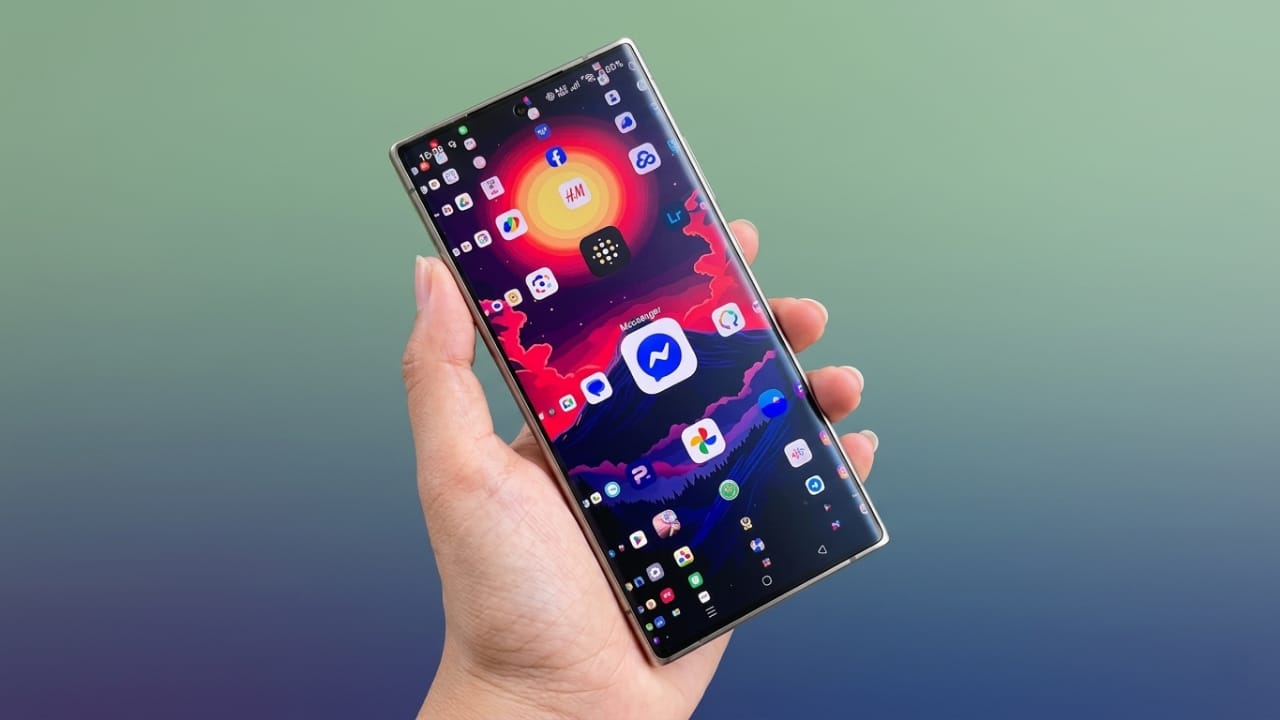
Modern smartphones make it easy to install dozens of apps, but finding the right one at the right time is not always convenient. As the number of apps grows, home screens become crowded and navigation takes longer. Many users create folders, organize icons, or rely on search tools, yet quickly locating an app can still be frustrating.
Advertisements
Lens Launcher offers a different approach. It is designed to help users access all their installed apps from a single screen, making navigation faster and more organized.
Also read: 3D Photo Live Wallpaper: Create a Unique 3D Cube Wallpaper with Your Favorite Photos
What is Lens Launcher?
Lens Launcher is an Android launcher that displays all installed apps together on one screen. Instead of swiping through multiple pages or opening folders, users can view every app in a compact layout.
The launcher uses a unique magnification effect that enlarges icons around your finger, making it easier to select the app you want. This design combines a clean appearance with practical functionality, helping users reach apps more efficiently.
How Does Lens Launcher Work?
After setting Lens Launcher as the default launcher, all app icons are arranged on a single screen in a compact grid.
When you move your finger across the display, the icons near your touch point become larger through a zoom effect. This allows you to quickly identify and open an app without scrolling through multiple screens.
The concept is simple but effective, especially for users who keep a large number of apps on their devices.
Key Features of Lens Launcher
1. Access All Apps on One Screen
Every installed app can be viewed in a single place, reducing the need to switch between home screen pages.
2. Dynamic Zoom Effect
The launcher provides a smooth magnification effect that enlarges nearby icons for easier selection.
3. Customization Options
Users can adjust settings such as icon size, grid density, spacing, and zoom behavior to match their preferences.
4. Lightweight Performance
Lens Launcher is designed to run smoothly without placing a heavy load on system resources or battery life.
5. Clean and Minimal Interface
The simple layout keeps distractions to a minimum and focuses on quick app access.
6. Haptic Feedback Support
Compatible devices can provide subtle vibration feedback during interactions, creating a more responsive experience.
Why Consider Using Lens Launcher?
Many smartphone users have dozens, and sometimes hundreds, of apps installed. Finding a specific app can take time when navigating through multiple screens.
Lens Launcher simplifies this process by keeping everything visible in one place. Instead of searching through folders or scrolling endlessly, users can quickly locate and launch apps with minimal effort.
For people who value speed and efficiency, this approach can make everyday phone usage more convenient.
Who Is It Best For?
Lens Launcher may be a good choice for:
- Users who prefer a minimal and uncluttered interface
- People with many installed applications
- Those looking for faster app access
- Users interested in trying a different launcher experience
- Anyone who values simplicity and productivity
How to Get Started
Using Lens Launcher is straightforward:
- Download Lens Launcher from the Google Play Store.
- Open the app after installation.
- Set it as your default launcher when prompted.
- Customize settings such as icon size, grid layout, and zoom sensitivity.
- Start accessing all your apps from a single screen.

Also read: LED Keyboard – Colorful RGB Lighting Keyboard for a Stylish Typing Experience
Final Thoughts
Lens Launcher offers a creative alternative to traditional Android launchers. Its one-screen layout and magnification effect make app navigation feel different from the standard smartphone experience.
While it may not replace every user’s preferred launcher, it can be an interesting option for those who want a faster and more organized way to access their apps. If you enjoy clean designs and efficient navigation, Lens Launcher is worth exploring.

Abhi Rajput, founder of EarnAbhi.in, is a tech lover with 6+ years of experience in SEO, digital tools, and smartphone troubleshooting. He writes simple, clear, and useful guides to help people solve real tech problems.
Advertisements