Many Android users install dozens of apps on their phones over time. As the number of apps grows, the home screen can become crowded with icons, folders, widgets, and shortcuts. Finding the app you need quickly may become frustrating.
Advertisements
If you prefer a cleaner and more organized smartphone experience, Niagara Launcher is an option worth considering. It is a lightweight Android launcher designed to keep your home screen simple, fast, and easy to use.
Also read: LED Keyboard – Colorful RGB Lighting Keyboard for a Stylish Typing Experience
A Minimal Design That Feels Refreshing
One of the main reasons people choose Niagara Launcher is its clean appearance. Instead of filling the screen with multiple pages of apps and widgets, it focuses on simplicity.
The launcher displays your most important apps in an organized way, while other apps remain easy to access whenever needed. This approach helps reduce visual clutter and creates a more relaxing user experience.
Find Apps Faster
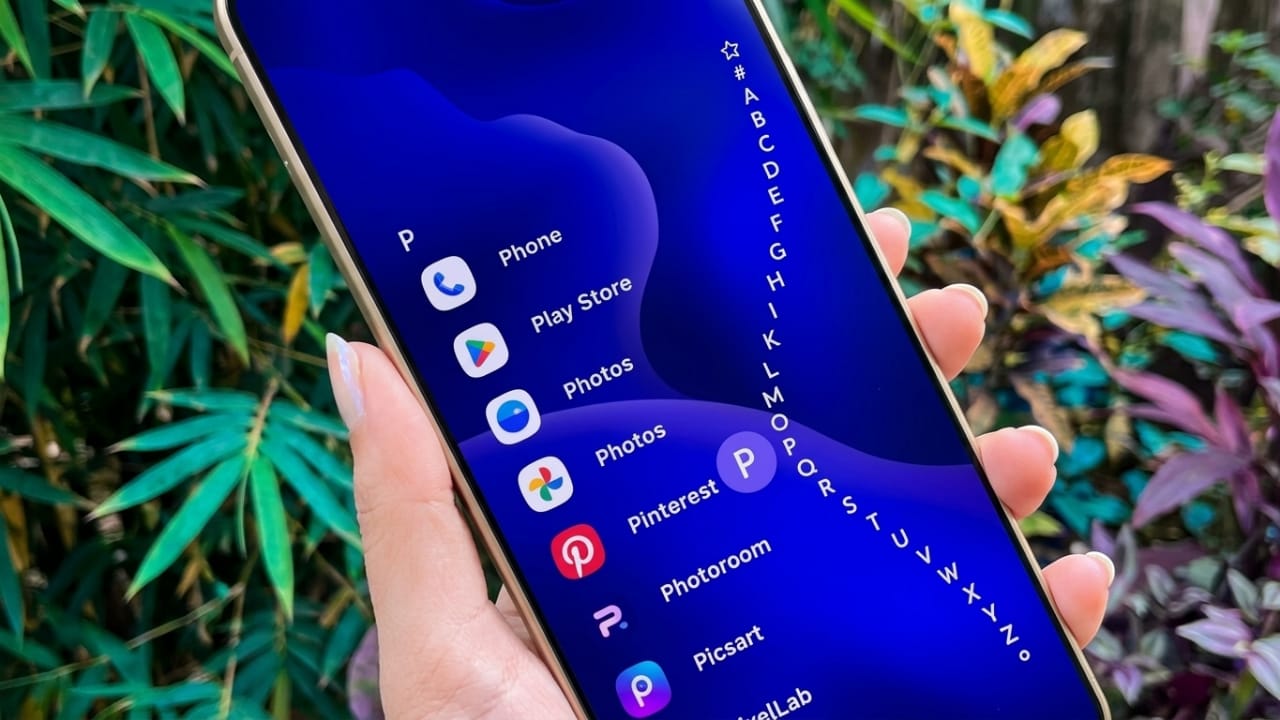
Searching through long app lists can take time, especially when many applications are installed. Niagara Launcher includes a convenient alphabetical navigation system that makes app discovery much quicker.
By sliding your finger along the side of the screen, you can jump directly to apps based on their starting letter. Frequently used apps can also be pinned for even faster access.
Easier Notification Access
Niagara Launcher offers a different approach to notifications. Instead of constantly opening the notification panel, users can view important updates directly from the home screen.
This allows you to check messages, emails, and other alerts more conveniently while reducing unnecessary interruptions during daily use.
Clean Experience Without Unwanted Ads
Advertisements can sometimes affect the overall experience of using a launcher. Niagara Launcher focuses on providing a cleaner interface without filling the home screen with distracting promotional content.
This helps create a smoother and more enjoyable environment for everyday smartphone use.
Useful Customization Options
Although Niagara Launcher follows a minimal design philosophy, it still provides several personalization features.
Users can customize elements such as:
- Themes
- Icons
- Fonts
- Home screen appearance
- Selected widgets like clock or weather information
The customization options are designed to maintain a clean layout while allowing users to make the launcher feel more personal.
Lightweight and Smooth Performance
Performance is another strong point of Niagara Launcher. Because it is designed to be lightweight, it can run smoothly on both newer and older Android devices.
Its efficient design may help reduce unnecessary resource usage, allowing the phone to feel responsive during everyday tasks.
Why Many Android Users Like Niagara Launcher
Niagara Launcher has gained popularity among Android users who prefer a simple and distraction-free interface. Many people appreciate its focus on speed, organization, and ease of use.
Some commonly appreciated features include:
- Clean and organized home screen
- Quick access to apps
- Simple navigation system
- Convenient notification handling
- Lightweight performance
- Modern and elegant design
- Easy customization options

Also read: Lens Launcher: A Smarter Way to Access All Your Apps
Final Thoughts
Niagara Launcher is a good choice for Android users who want a cleaner and more focused smartphone experience. Its simple design, fast app access, and lightweight performance help create a home screen that feels organized without being complicated.
If you enjoy minimalism and want to reduce clutter on your device, Niagara Launcher is worth trying. A cleaner home screen can make everyday phone use feel more comfortable, efficient, and enjoyable.

Abhi Rajput, founder of EarnAbhi.in, is a tech lover with 6+ years of experience in SEO, digital tools, and smartphone troubleshooting. He writes simple, clear, and useful guides to help people solve real tech problems.
Advertisements