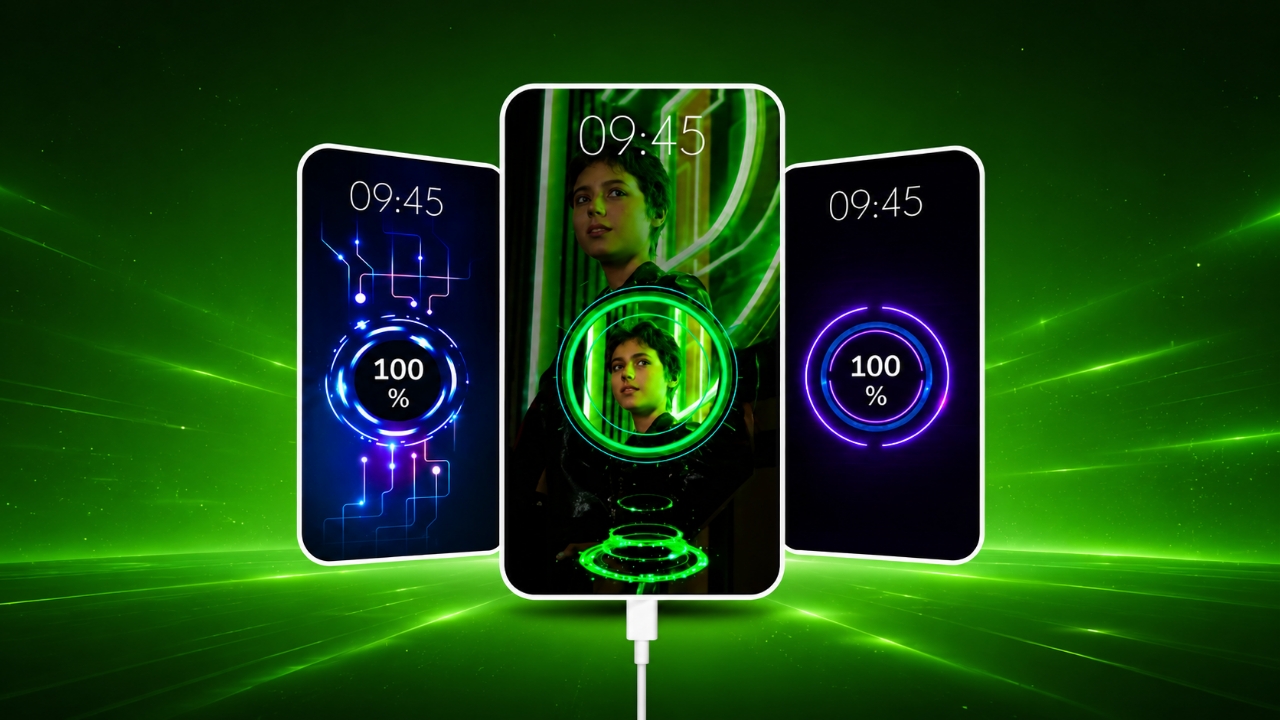
Most Android phones display a basic charging screen when plugged in. While it gets the job done, it often looks plain and uninteresting. If you enjoy customizing your smartphone, a charging animation app can make the charging experience more visually appealing.
Advertisements
Battery Charging Animation 4K is an Android application designed to replace the standard charging screen with animated effects, stylish themes, and useful battery details. It allows users to personalize how their phone looks while charging without making major changes to the device.
Also read: Give Your Android Phone a Fresh Look with GO Launcher S
What Is Battery Charging Animation 4K?
Battery Charging Animation 4K is a customization app for Android devices. When you connect your phone to a charger, the app displays animated charging effects instead of the default charging screen.
The app offers a variety of visual styles that can help make your smartphone feel more personalized and modern.
Key Features
High-Quality Charging Animations
One of the main attractions of the app is its collection of detailed charging animations. These effects are designed to create a more engaging charging experience compared to the standard screen found on most devices.
Wide Selection of Themes
The app includes numerous charging screen designs, allowing users to choose a style that matches their preferences. Popular theme categories may include:
- Neon-inspired effects
- RGB-style lighting animations
- Electric charging visuals
- Futuristic designs
- Energy wave effects
- Gaming-themed animations
Users can switch between themes whenever they want.
Battery Information at a Glance
In addition to visual effects, the app can display useful battery-related information during charging, such as:
- Current battery percentage
- Charging status
- Battery temperature
- Battery health information
- Voltage details
Having this information available on the charging screen can help users keep track of their device’s battery condition.
Easy-to-Use Interface
The app is designed with simplicity in mind. Most settings are clearly organized, making it easy for both new and experienced Android users to navigate.
Smooth Performance
Many users prefer apps that do not heavily impact device performance. Battery Charging Animation 4K is designed to provide animations while maintaining a smooth user experience on compatible devices.
Why People Use Charging Animation Apps
Smartphone customization has become increasingly popular. Users often personalize wallpapers, icons, widgets, and themes to make their devices unique.
Charging animation apps add another layer of customization by enhancing the appearance of the charging screen. Some common reasons people use them include:
- Creating a more stylish phone setup
- Making charging screens look modern
- Personalizing the device experience
- Viewing battery information more conveniently
- Exploring different visual themes
How to Set Up the App
Getting started is usually straightforward:
- Download the app from a trusted source such as the Google Play Store.
- Open the app and complete the initial setup process.
- Browse the available animation themes.
- Select your preferred charging effect.
- Enable the animation feature if required.
- Connect your charger to view the selected animation.
The exact steps may vary depending on the app version and device model.
Popular Animation Categories
Neon Effects
Bright colors and glowing designs make neon themes one of the most popular choices among users.
Lightning Animations
These effects create dynamic visuals that resemble electrical energy flowing during charging.
Futuristic Designs
Inspired by modern technology concepts, these themes often feature sleek interfaces and advanced-looking graphics.
RGB Lighting Effects
RGB-style animations are especially popular among gaming enthusiasts and users who enjoy colorful visual effects.
Energy Flow Animations
These themes focus on smooth energy movement and charging progress visuals.
Battery Monitoring Features
Some versions of charging animation apps may also provide battery-related insights, including:
- Estimated charging progress
- Charging speed information
- Battery temperature
- Battery health indicators
- Current charging status
These details can help users better understand how their device is performing while connected to a charger.
Does It Affect Battery Life?
A common concern is whether charging animation apps can damage a phone’s battery.
In most cases, these apps primarily display visual effects on the screen and do not directly alter the battery’s charging process. However, users should always follow good safety practices:
- Download apps from trusted sources
- Review permissions before installation
- Keep the app updated
- Disable features that are not needed
Using reputable applications and managing permissions carefully can help ensure a safer experience.
Who Might Enjoy This App?
Battery Charging Animation 4K may appeal to a wide range of Android users, including:
- Smartphone customization fans
- Mobile gamers
- Technology enthusiasts
- Students
- Content creators
- App reviewers
Anyone who enjoys personalizing their device may find these charging effects interesting.
What Makes It Stand Out?
There are many charging animation apps available, but some features that users often look for include:
Quality Visuals
Detailed graphics and smooth animations can create a more polished charging experience.
Broad Theme Collection
A large selection of themes allows users to frequently change the look of their charging screen.
Simple Setup Process
Apps that are easy to configure are generally more accessible for beginners.
Modern Design
Clean layouts and updated visual styles can make the app feel more enjoyable to use.
Useful for Content Creators
Creators who make smartphone-related content may use charging animations when producing videos about Android customization.
Examples include:
- Phone setup showcases
- App review videos
- Android customization tutorials
- Smartphone tips and tricks
- Short-form social media content
Animated charging screens can add extra visual interest to such content.
Privacy and Permissions
Before installing any customization app, it is important to review the permissions it requests.
Some charging animation apps may require access to:
- Display overlays
- Notifications
- Battery information
Only grant permissions that are necessary for the app’s functionality, and review privacy information provided by the developer.
Official Play Store Link
Also read: Batix – Charging Photo: Personalize Your Android Charging Screen with Photos and Animations
Final Thoughts
Battery Charging Animation 4K offers a simple way to customize your Android device’s charging screen with animated effects and stylish themes. Along with visual enhancements, it may also provide useful battery information that can be viewed while charging.
For users who enjoy personalizing their smartphones, this type of app can add a fresh and modern touch to the overall experience. As always, download apps from trusted sources and review permissions carefully before use.

Abhi Rajput, founder of EarnAbhi.in, is a tech lover with 6+ years of experience in SEO, digital tools, and smartphone troubleshooting. He writes simple, clear, and useful guides to help people solve real tech problems.
Advertisements