Most smartphones require you to wake the screen before you can check the time. An Always On Display can make this easier by keeping selected information visible even when the phone is not being actively used.
Always On Display Clock Widget is an Android customization app that focuses on clock designs and useful information for compatible smartphones. Depending on the device, it can show the time, date, day, battery level and notification details without requiring users to open the full screen.
Advertisements
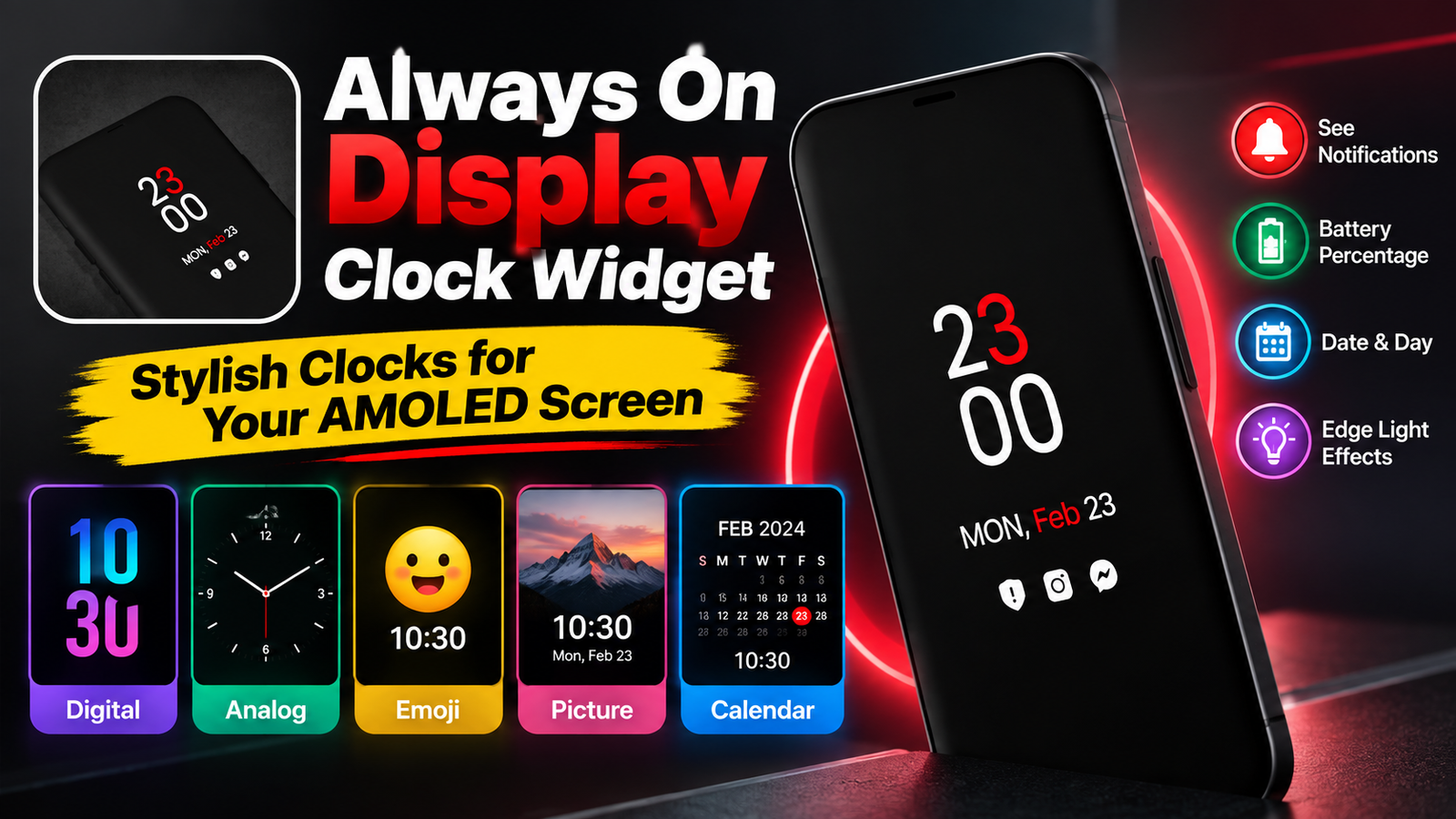
The app also offers several clock styles, including digital, analog, emoji, picture and calendar-based designs.
Also read: Notch Launcher: Turn Your Camera Cutout Into a Handy Shortcut Area
What Is Always On Display Clock Widget?
Always On Display Clock Widget is an Android app created for users who want to customize the information shown while their phone is idle.
On supported devices, the app can keep a small portion of the display active instead of lighting up the entire screen. This makes it possible to check basic information at a glance.
The features available to you may differ depending on your smartphone model, display technology and system settings.
Different Clock Designs to Choose From
The biggest attraction of the app is its range of clock styles. Users are not limited to a single design and can choose an appearance that suits their personal taste.
Available options include:
- Digital clock
- Analog clock
- Emoji clock
- Picture clock
- Calendar clock
This makes the app more suitable for people who want their always-on screen to look different from the default clock provided by their phone.
Digital Clock Options
The digital clock is a straightforward choice for users who prefer a clean and easy-to-read display.
The app provides customization options for different parts of the digital clock. Depending on the available settings, users can adjust colors and other visual elements to create a style that fits their phone.
Analog and Emoji Clock Styles
Users who prefer a traditional watch-like appearance can choose an analog clock. The app includes different analog designs, giving users alternatives to a standard digital display.
For something more casual, there is also an emoji-based clock option. Emojis and stickers can be used as part of the display, creating a more playful appearance.
Picture and Calendar Clock Features
The picture clock option provides another way to personalize the display by combining clock information with a selected image or supported wallpaper style.
The calendar clock is useful for people who want date-related information to remain visible along with the time. Instead of waking the phone just to check the date, the information can be available directly on the idle display when supported by the device.
Display Notifications and Battery Details
The app is not limited to showing the time. It can also display information such as:
- Date
- Day
- Battery percentage
- Notifications
Having these details available can be convenient when you only want to take a quick look at your phone.
The app also mentions gesture-based controls. Depending on the device and settings, actions such as tapping, double-tapping or sliding can be used to minimize or disable the display.
Edge Light Feature
Another customization option is Edge Light. This feature adds lighting effects around the edges of the smartphone screen.
It can give the display a more decorative look and can be used alongside the selected clock design. The exact appearance and behavior may depend on the phone being used.
Does It Affect Battery Life?
Always-on display features can have an effect on battery usage because some parts of the screen remain active.
The app description refers to AMOLED technology, where individual pixels can be controlled independently. However, battery consumption is not identical across all smartphones.
Factors such as display type, brightness, refresh settings, phone hardware and how frequently the display is active can affect power usage. Therefore, users should check how the feature behaves on their particular device rather than assuming a fixed battery impact.
Overall Experience
Always On Display Clock Widget is mainly aimed at Android users who want more control over the appearance of their idle screen.
Its selection of digital, analog, emoji, picture and calendar clock styles gives users several ways to personalize the display. Additional information such as battery level, date and notifications can also make the screen more useful.
The app may be worth exploring if your smartphone supports the required always-on display functionality and you enjoy customizing the way your phone looks.
As with any display customization app, available features and performance can vary between devices.
Frequently Asked Questions
What does Always On Display Clock Widget do?
It is an Android customization app that can display clock information and other details, such as the date, battery percentage and notifications, on compatible smartphones.
Does it have both digital and analog clocks?
Yes. The app includes digital and analog clock styles, along with options such as emoji, picture and calendar clocks.
Can the digital clock be customized?
Yes. The app provides customization options for the appearance of the digital clock, including colors and other visual elements.
Official Play Store App Link
Also read: 53 Themes, Zero Clutter: A Modern Launcher for a Cleaner Android Home Screen
Final Verdict
Always On Display Clock Widget offers a collection of clock designs for Android users who want to personalize their phone’s idle screen. Its different styles, notification information, battery details, calendar options and Edge Light feature provide more customization than a basic clock.
Before using it continuously, check whether your smartphone supports the required display features and keep an eye on battery usage. For compatible devices, it can be a simple way to give the always-on screen a more personalized appearance.

Abhi Rajput, founder of EarnAbhi.in, is a tech lover with 6+ years of experience in SEO, digital tools, and smartphone troubleshooting. He writes simple, clear, and useful guides to help people solve real tech problems.
Advertisements