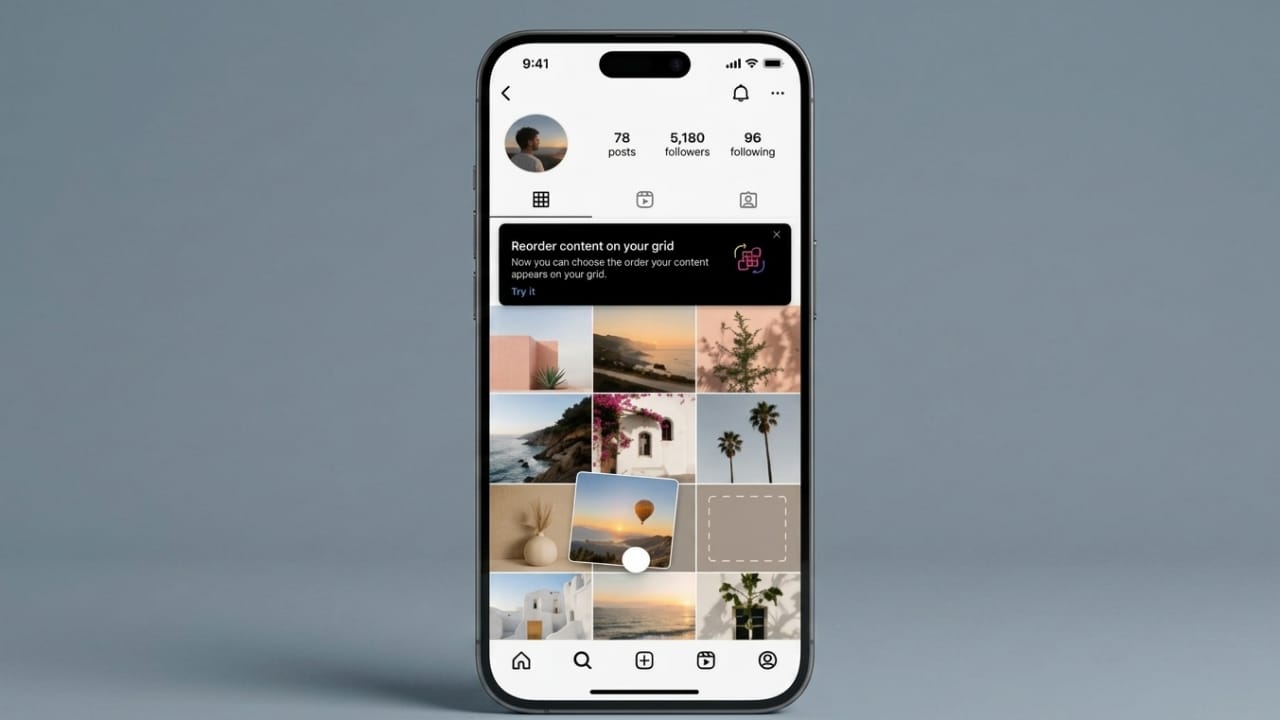
Instagram has launched a new feature that many users have been waiting for. The platform now allows people to rearrange posts on their profile grid, making it easier to create a personalized and visually appealing profile.
Advertisements
This update gives users more flexibility in how their content is displayed. Instead of being limited by the order in which posts were published, users can now place posts wherever they want on their profile.
Also read: iOS 27 Introduces Independent Volume Controls on iPhone
What Is the Profile Grid Reorder Feature?
The new Profile Grid Reorder feature lets users change the position of existing posts without deleting or reposting them. While the layout can be customized, the original posting date, likes, comments, and engagement remain unchanged.
In the past, Instagram profiles displayed posts mainly in chronological order, with the newest content appearing first. Aside from pinning a few posts at the top, there were limited options for organizing a profile.
With this update, users have much greater control over how their content is presented.
Main Benefits of the Feature
The new tool offers several advantages:
- Rearrange posts without reposting content.
- Keep original publication dates and engagement data intact.
- Create a cleaner and more organized profile appearance.
- Highlight important content more effectively.
- Improve profile presentation for personal and professional use.
Pinned posts will continue to stay at the top of the profile, even when other posts are rearranged.
Why This Update Matters
Many Instagram users pay close attention to how their profiles look. A well-organized profile can leave a stronger impression on visitors.
For content creators, photographers, artists, and businesses, Instagram profiles often serve as a portfolio or showcase. Before this feature was introduced, maintaining a specific layout could be difficult because every new post changed the grid arrangement.
Some users resorted to deleting and reposting content or using complicated planning methods to keep their profiles looking the way they wanted. The new reordering option removes the need for those workarounds.
Now, users can update their profile layout whenever needed and place their most important posts in prominent positions.
How to Use the Reorder Grid Feature
Instagram has designed the feature to be simple and easy to use.
Follow these steps:
- Open your Instagram profile.
- Press and hold a post on your profile grid.
- Select the “Reorder Grid” option.
- Drag the post to your preferred position.
- Place it where you want within the grid.
- Save the changes.
The updated layout becomes visible immediately after the changes are applied.
A Step Toward Greater Profile Customization
Instagram has been working on giving users more creative control over their profiles. The Profile Grid Reorder feature is one of the most requested customization tools introduced by the platform.
By allowing users to organize content more freely, Instagram helps profiles better reflect personal style, branding goals, and creative preferences.
The update is especially useful for creators and businesses that want a polished and professional appearance without affecting the performance history of their posts.
Also read: How to Fix Blue Screen Errors in Windows 11: Complete Troubleshooting Guide
Final Thoughts
The Profile Grid Reorder feature brings a new level of flexibility to Instagram profiles. Users can now arrange their content in a way that best represents their personality, brand, or creative work.
Whether you are a creator, business owner, or casual user, this update makes it easier to build a profile that looks organized, attractive, and tailored to your goals.

Abhi Rajput, founder of EarnAbhi.in, is a tech lover with 6+ years of experience in SEO, digital tools, and smartphone troubleshooting. He writes simple, clear, and useful guides to help people solve real tech problems.
Advertisements