Cookies help websites remember your preferences, keep you signed in, and improve your browsing experience. When cookies are enabled, many websites load faster and work more smoothly because they can store useful information from your previous visits.
If cookies are disabled, some websites may not function correctly. You may have to sign in repeatedly or reset your preferences each time you visit.
Advertisements
Also read: How to Change the Default Notification Sound on iPhone and Bring Back the Tri-Tone Alert
Key Highlights
- Enable cookies for a smoother and faster browsing experience.
- Use privacy settings to limit unnecessary online tracking.
- Avoid blocking all cookies unless it is absolutely necessary.
- Clear old cookies occasionally to keep your browser running efficiently.
What Are Cookies?
Cookies are small data files that websites save on your device. They help remember information such as your login details, language preferences, and other settings. This makes future visits more convenient because you do not have to enter the same information repeatedly.
Cookies also improve the performance of many websites. For example, online shopping sites can remember the items you viewed or added to your cart, making it easier to continue where you left off.
Some websites also use cookies to show content or advertisements that match your interests. While this can improve your experience, some cookies may also be used to track your activity across multiple websites.
To maintain a good balance between convenience and privacy, it is a good idea to review your cookie settings from time to time.
How to Enable Cookies in Different Browsers
Google Chrome (Desktop)
- Open Google Chrome.
- Click the three-dot menu and select Settings.
- Go to Privacy and Security.
- Open the Third-party Cookies section.
- Choose the option to allow third-party cookies if needed.
- Make sure cookies are not completely blocked.
Chrome on iPhone
Apple automatically limits many third-party cookies on iPhone.
To review Chrome-related settings:
- Open the Settings app.
- Scroll down and tap Chrome.
- Enable Allow Cross-Website Tracking if available on your device.
Safari on Mac
- Open Safari.
- Click Safari > Settings.
- Select the Privacy tab.
- Turn off Prevent Cross-Site Tracking if required.
- Make sure Block All Cookies is disabled.
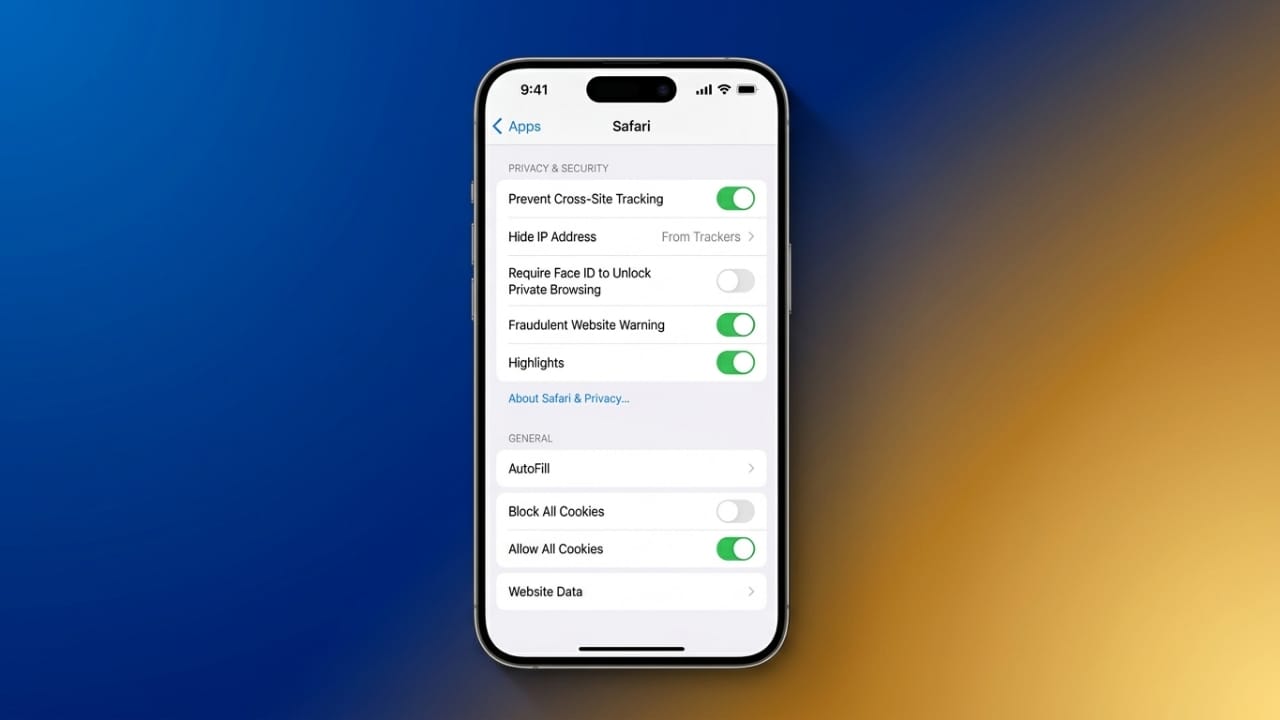
Safari on iPhone
- Open the Settings app.
- Tap Apps, then select Safari.
- Turn off Prevent Cross-Site Tracking if you want websites to use cookies more effectively.
- Ensure Block All Cookies is turned off.
- You can also enable Hide IP Address for additional privacy.
Mozilla Firefox (Desktop)
- Open Firefox.
- Go to Settings.
- Select Privacy & Security.
- Choose the Standard tracking protection level.
- Avoid using Strict mode if websites are not working properly.
Firefox on iPhone
- Open Firefox.
- Go to Settings.
- Tap Privacy & Security.
- Make sure cookies are allowed.
- Using the Standard protection setting usually provides the best balance between privacy and compatibility.
Microsoft Edge
- Open Microsoft Edge.
- Go to Settings.
- Select Privacy, Search, and Services.
- Open the cookie settings.
- Turn off the option that blocks third-party cookies if necessary.
- Restart the browser after making changes.
Tips to Protect Your Privacy
Enabling cookies does not mean giving up your privacy. You can still browse safely by adjusting your browser’s privacy settings.
Here are a few simple tips:
- Clear cookies regularly to remove outdated browsing data.
- Enable tracking protection whenever available.
- Review website permissions occasionally.
- Only allow cookies from websites you trust.
- Keep your browser updated with the latest security improvements.
Blocking every cookie is generally not recommended because it can prevent some websites from working properly or require you to sign in every time you visit.
Also read: How to Block Someone on Snapchat: A Simple Guide to Protect Your Privacy
Final Thoughts
Cookies make browsing easier by remembering your preferences and helping websites function correctly. At the same time, it is important to manage your privacy settings carefully.
A balanced approach works best. Allow the cookies you need, remove old data regularly, and review your browser settings from time to time. This helps you enjoy a smoother browsing experience while keeping your personal information better protected.

Abhi Rajput, founder of EarnAbhi.in, is a tech lover with 6+ years of experience in SEO, digital tools, and smartphone troubleshooting. He writes simple, clear, and useful guides to help people solve real tech problems.