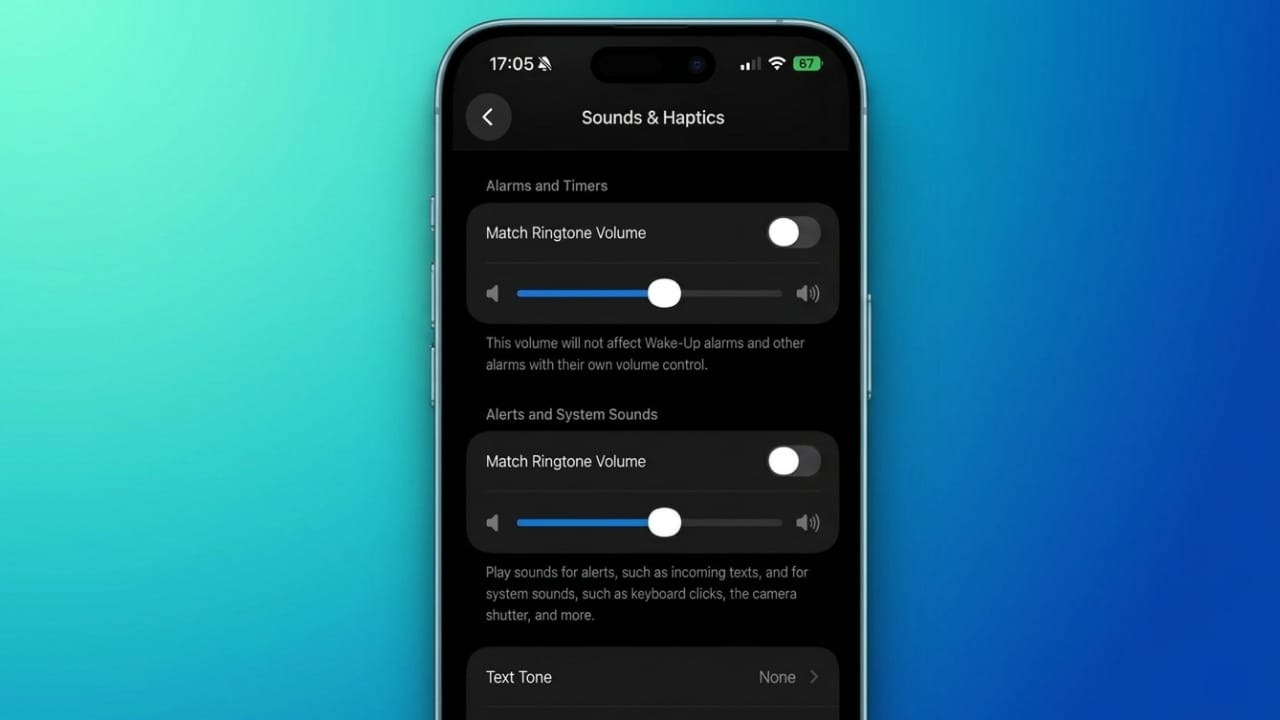
Apple has added a long-requested audio feature in iOS 27 that gives users more control over their iPhone sound settings. The update allows different types of sounds to have their own volume levels, making everyday use more convenient and customizable.
Advertisements
Also read: How to Fix Blue Screen Errors in Windows 11: Complete Troubleshooting Guide
Highlights
- Separate volume controls for different sound categories.
- Alarms and ringtones can be adjusted independently.
- Better control over important alerts and notifications.
- New options to customize how volume buttons work.
Better Audio Control in iOS 27
For years, many iPhone users wanted the ability to manage different sound types separately. In earlier versions of iOS, several audio settings were linked together. Changing one volume level often affected others, which could lead to unwanted results.
For example, lowering notification sounds could also reduce alarm volume. Similarly, reducing ringtone volume might increase the risk of missing incoming calls. This made audio management less flexible than many users preferred.
With iOS 27, Apple has addressed this issue by introducing dedicated volume controls for various sound categories. Users can now find these options in the Sound & Haptics settings section.
The update provides separate sliders for sounds such as:
- Ringtones
- Alarms
- Timers
- System alerts
This allows users to customize each category according to their personal preferences while ensuring important alerts remain easy to hear.
New Volume Sync Option
Apple has also included a feature called Match Ringtone Volume. This setting gives users additional flexibility when managing audio levels.
When enabled, multiple sound categories can continue to follow the ringtone volume, similar to how previous iOS versions worked. When turned off, each category can be adjusted independently.
This means users can keep alarm sounds loud enough to wake them up while keeping notifications quieter throughout the day. Ringtone volume can also be set separately based on individual needs.
The settings interface includes easy-to-use sliders, making volume adjustments quick and straightforward.
Improved Volume Button Behavior
Another useful addition is a new option that controls how the physical volume buttons affect sound settings.
Users can choose whether the side buttons should change ringtone volume or only adjust media volume. This helps prevent accidental changes to important sound levels and provides greater control over the overall audio experience.
More Features Included in iOS 27
Along with the new volume controls, iOS 27 introduces several other software enhancements.
Apple has expanded its artificial intelligence features, bringing new capabilities across the system. Siri receives additional improvements, and users can expect smarter interactions in various apps and services.
The update also includes:
- New photo editing and enhancement tools
- Additional parental control features
- More personalization options
- Interface customization improvements
These additions aim to make the iPhone experience more flexible and user-friendly.
A Few Limitations Remain
While the new audio controls offer much more flexibility, some restrictions still exist.
Users cannot assign a unique volume level to every individual alarm. Instead, volume settings are managed through broader categories. Certain alarms, such as Wake-Up alarms, already have their own controls and continue to work independently.
System alerts also include sounds such as:
- Message notifications
- Keyboard clicks
- Camera shutter sounds
- Other system-generated audio
Even with these limitations, sound management is now significantly more organized than before.
Availability
Apple has already released the developer beta version of iOS 27. Public beta testing is expected to follow, with the final update becoming available to supported iPhone models at a later date.
Also read: Apple Introduces Smarter AI Photo Editing Tools in the Photos App
Final Thoughts
The addition of independent volume controls is one of the most practical improvements in iOS 27. By allowing users to manage alarms, ringtones, and system sounds separately, Apple has made the iPhone more customizable and easier to use.
For users who have wanted better control over their device’s audio settings, this update delivers a simple yet meaningful improvement that can make a noticeable difference in daily use.

Abhi Rajput, founder of EarnAbhi.in, is a tech lover with 6+ years of experience in SEO, digital tools, and smartphone troubleshooting. He writes simple, clear, and useful guides to help people solve real tech problems.
Advertisements